Laptop shopping gets confusing because the two most common types do very different jobs. Ultrabooks and gaming laptops are built around different priorities, and picking the wrong one usually means either a heavy machine you rarely carry or a light one that struggles with the games and programs you actually enjoy. Here is how to tell which one matches how you really work, without getting sold on specs you will never use.
Start from your week rather than the specification sheet. A laptop is a bundle of compromises you carry around all day, and which compromises annoy you depends on where you sit.
What Each Type Is Built Around
An ultrabook is designed to be thin, light, and easy to carry all day, with battery life that lasts through a full day of work without hunting for a plug. A gaming laptop is built around performance, with a bigger screen, a dedicated graphics card, and strong cooling to handle demanding games and creative software. That single design difference shapes everything else, from weight and fan noise to how long the battery lasts between charges.
Neither design is a mistake. They solve different problems with similar budgets. An ultrabook spends its limited space on a thin frame, a light chassis, and a battery meant to survive a day away from power, which leaves almost nothing over for heavy cooling. A gaming laptop spends that space on airflow, on a larger battery, and on parts that can draw far more power when you ask them to.
What an Ultrabook Quietly Gives Up
The largest thing an ultrabook gives up is sustained speed. It feels quick in a browser, in email, in documents, and in video calls, because those jobs arrive in short bursts and the processor finishes before the machine gets warm. Ask it to do one heavy thing for twenty minutes straight and it slows itself down to stay cool. A long export or a demanding game will make it run warm and lose speed as it goes.
It also gives up room to grow. Thin bodies mean fewer ports, so you end up carrying an adapter for a monitor, a card reader, or an older cable. Memory and storage are often fixed at purchase, which means the model you buy is the model you keep.
What you get in return is a machine you stop thinking about. It goes into a bag without a second thought, it stays quiet in a meeting, and it does not need a charger at lunch. For anyone who moves between rooms, campuses, or cafes, that is a daily benefit. The trade works well for people whose heavy work happens rarely, or happens on a desktop they can reach remotely.
The Trade-Offs You Will Feel
The biggest trade-off is portability versus power. An ultrabook slips into a bag and barely registers, but it can run warm and slow under heavy work. A gaming laptop is heavier, louder, and drains its battery quickly, but it handles games and video editing far more comfortably. Price is another factor, because a machine with a dedicated graphics card generally costs more than a comparable lightweight option, and the cooling hardware that keeps it fast adds bulk and cost.
Weight and battery are the differences you notice every day. Raw performance only shows up on the days you need it. That mismatch is why so many people buy more power than they use and then resent carrying it.
Where a Gaming Laptop Starts to Wear on You
A gaming laptop is pleasant on a desk and awkward everywhere else. The walk to the car is not the problem. The hour spent walking a conference floor is, and so is a shoulder strap digging in on a crowded train. Many owners reach a point where they leave the machine at home and take a tablet instead.
The charger matters as much as the machine. Heavy gaming drains the battery fast, and many models fall back to a much slower setting when they run unplugged, so the performance you paid for is only available near a wall socket. That turns portable gaming into gaming that can be relocated, which is a different promise from the one on the box.
Heat is the other daily issue. Under load these machines push hot air out of the sides and the back, and the base can become uncomfortable on your legs. None of this argues against one if games are why you are buying. It argues for being honest about how often you will be away from a desk.
Battery Life and Fan Noise
Battery life is where the difference is most obvious. A good ultrabook can often run a full working day, while a gaming laptop might need a charger by the early afternoon under load. Fan noise follows the same pattern. Gaming laptops spin their fans hard and sound like a small jet when they are pushed, which is fine at a desk but embarrassing in a quiet meeting. If you work in libraries, on planes, or next to people, the noise alone can be a deal-breaker.
Small habits help. Lowering screen brightness, closing background apps, and choosing the quieter power mode can add real hours to an ultrabook and soften the drain on a gaming machine. What you cannot change is the physical size of the battery.
Cooling and Noise as You Actually Live With Them
Fan noise is easier to tolerate in a review than in a life. A gaming laptop at rest is usually quiet, and the fans only become obvious once a game or a heavy program starts. Then the machine sounds like a small appliance running in the corner. With headphones on at a desk you will forget it is there. In a shared room, a lecture hall, or a bedroom next to someone trying to sleep, it becomes a problem you plan around.
Thermal throttling is the quieter version of the same story. When a thin machine cannot shed heat fast enough, it reduces its own speed to protect itself, so the numbers on the box describe the first minute rather than the twentieth. A thicker machine with better cooling often feels faster across a long session even when the parts look similar on paper. That is the real value of the extra bulk.
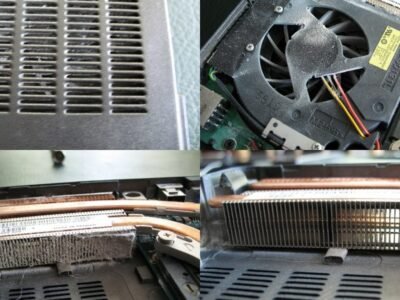
You can help both. Keep the vents clear of bedding and dust, use a hard flat surface, and clear the vents of dust after a year or two, because a clogged heatsink makes any cooling design work harder than it should.
Screen, Build, and Long-Term Value
Screens differ too. Ultrabooks tend to offer sharp, bright displays that are great for text and photos, while gaming laptops often go for faster refresh rates that make motion smoother. Build quality and port size vary widely in both categories, so it pays to check real reviews rather than trust the marketing. Think about the whole picture: the weight you carry, the screen you look at, and the keyboard in front of you.
Two screen traits matter for daily comfort: how bright the panel gets and how it handles reflections. A bright matte screen stays readable near a window or outdoors, while a glossy one looks richer indoors and turns into a mirror in daylight.
What to Look for in a Keyboard and Screen
You touch the keyboard far more than you read the specification sheet. What matters is key travel, which is how far each key moves when you press it down, and how firm the response feels under your fingers. Long travel with a clear stop is satisfying for typing and common on thicker machines. Short travel feels quicker and suits people who mostly tap between windows. Neither is better in the abstract, so type on the actual model before you commit.
Layout quirks deserve a look as well. Half-height arrow keys, a cramped backspace, or a trackpad that sits off-centre can annoy you for as long as you own the machine. Backlighting matters if you work at night, and a full set of keys matters if you type on figures all day.
On the screen side, think about what you look at. If you read text for hours, sharpness, even brightness, and a matte finish keep your eyes comfortable. If you edit photos, colour accuracy and a panel that covers a wide range of colours matter more. If you play fast games, smooth motion and quick response matter more than colour.
Which One Should You Actually Buy
Match the laptop to the way you will use it. If you travel, write, study, or do most of your work in a browser, an ultrabook is comfortable and practical. If you play modern games or push heavy creative software, a gaming laptop is worth the extra weight. A lot of people land in the middle, and there are capable general-purpose laptops that balance the two without going all the way to either extreme.
Count days rather than tasks. If heavy gaming or creative work happens most evenings, a gaming laptop earns its weight.
The Middle Ground That Suits Most People
Most people need neither extreme, and the market reflects that. General-purpose laptops sit between the two: light enough to carry every day, strong enough for photo editing and light gaming, and quiet enough for a meeting. They will not match a gaming laptop in the newest demanding titles, and they are rarely as thin as the thinnest ultrabook, but they cover most of what a student or a home user actually does.
You can also split the difference across machines. A light laptop for the working week and a desktop or console at home often costs less than one machine that tries to do everything, and it leaves you a better version of both.
Best For, and Skip If
Best for: commuters, writers, students, and business users — an ultrabook. Best for: gamers and video editors — a gaming laptop. Skip the gaming laptop if you only play light games and want a quiet, light machine. Skip the ultrabook if heavy games or video work are the reason you are buying, because it will not deliver the performance you are paying for.
Pros
- Ultrabooks: light, easy to carry, long battery, runs quietly.
- Gaming laptops: far stronger for games and heavy software.
- Gaming laptops: a bigger screen is nicer for long sessions.
- Both come in a very wide range of prices and sizes.
Cons
- Ultrabooks: struggle with demanding games and heavy renders.
- Gaming laptops: heavy, bulky, and loud under load.
- Gaming laptops: short battery life away from a charger.
- Gaming laptops: usually cost more for the same general specs.
Questions
Can an ultrabook run games?
It can run lighter, older, or less demanding games, but it will not perform like a gaming laptop. The integrated graphics in an ultrabook are built for everyday tasks and basic visuals, not high-end gaming, so expect to lower the settings on anything demanding.
Are gaming laptops good for work?
They can be, and many are very fast, but they are heavier, louder, and have shorter battery life than an ultrabook, which makes them less comfortable between meetings or on the go. If you want the power, the battery and weight are the price.
Do I need a dedicated graphics card?
Only if you play modern games or run software that uses graphics heavily, such as video editing or 3D work. For general web, office, and study use, a dedicated card is extra cost and power you probably will not need.
Is a light laptop enough for photo editing?
It usually is, as long as you are patient with very large files and heavy filters. Basic retouching, batch resizing, and everyday editing run fine on a good general-purpose machine. If you work with many high-resolution layers or long video projects, the extra power and cooling of a heavier machine will save you real time.
Your Next Step
Before you buy, write down the three tasks that matter most to you, then match the machine to them. If portability and battery lead, go ultrabook. If games and heavy creative software lead, accept the weight and go gaming. That one honest list will save you from an expensive regret.
If you can, spend a few minutes with the model in a shop before you order it. Weight in the hand and the feel of the keyboard are the two things no description can settle for you, and you will live with them longest.
Nexgadgets provides general information, not professional advice. Always do your own research.